1. Characteristics of Multiprocessor
[!IMPORTANT]
A multiprocessor system is a computer with two or more processors that share a common physical memory and can execute multiple processes simultaneously.
Basic Characteristics
-
Each processor in a multiprocessor system operates under a single operating system and shares peripherals.
-
All processors are connected via an interconnection network that enables communication and resource sharing.
-
They can work on the same or different tasks concurrently, improving throughput and system reliability.
Advantages
-
Increased Performance: Parallel execution of programs boosts computational speed.
-
High Reliability: If one processor fails, others can continue, improving fault tolerance.
-
Resource Sharing: Processors share expensive resources (memory, I/O), reducing cost.
-
Modular Expansion: System can be scaled by adding more processors.
Disadvantages
-
Complexity: Hardware and software design is more complex due to synchronization.
-
Cost: More hardware components raise costs.
-
Contention: Shared memory and buses can cause bottlenecks.
Classification of Multiprocessors
| Aspect | Tightly Coupled | Loosely Coupled |
|---|---|---|
| Processors | Share a common memory | Have local memories |
| Communication | Via shared memory | Message passing |
| Coupling | High (close interaction) | Low (independent nodes) |
| Fault Tolerance | Lower (shared components) | Higher (independent modules) |
| Example | SMP (Symmetric Multiprocessing) | Cluster computing systems |
2. Structure of Multiprocessor – Interprocessor Arbitration
Generic Block Diagram of Multiprocessor System
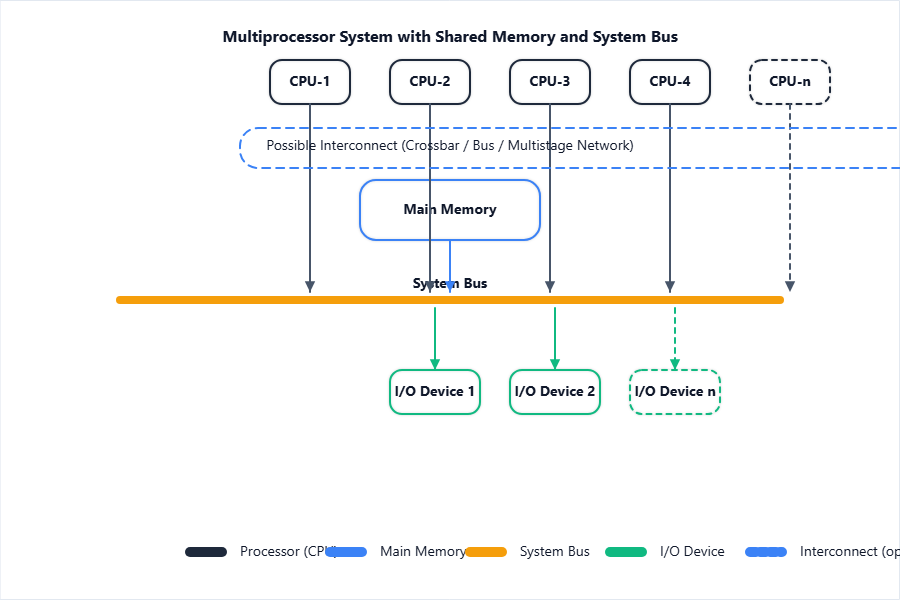
- The block diagram shows multiple processors sharing memory and I/O through a common bus/interconnection.
Centralized vs. Distributed Structures
-
Centralized: All processors share a single memory module controlled centrally. Simplifies communication but can have bottlenecks.
-
Distributed: Each processor has its own local memory; interconnection handles data exchange. Improves scalability and reduces contention.
Interconnection Networks
| Type | Description | Use Case |
|---|---|---|
| Bus | All processors connected to a single communication line. | Small systems |
| Crossbar | Each processor connects to every memory module individually | High-performance systems |
| Multistage | Switch-based, using layers of switches for routing. | Large/Scalable systems |
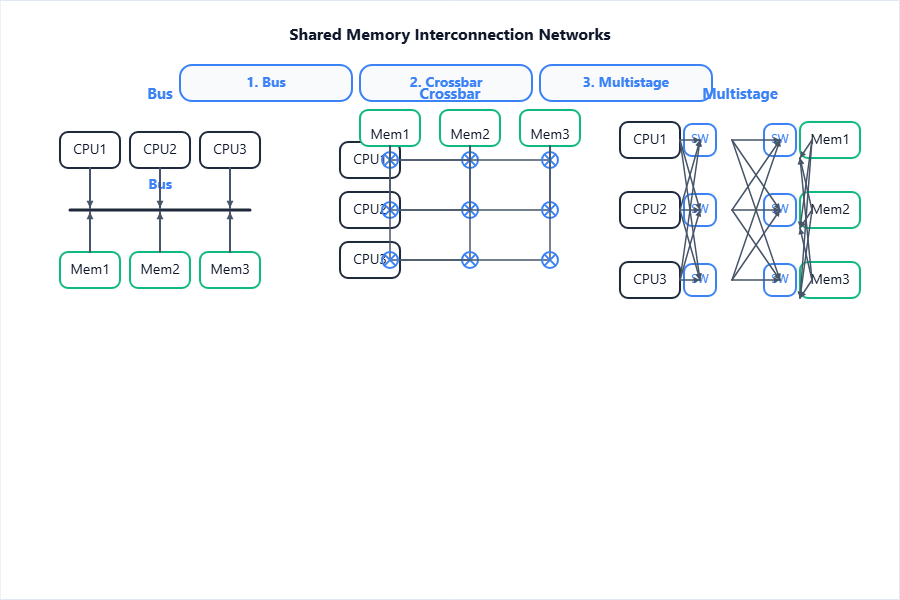
- Shows different multiplexing techniques for processor–memory communication.
Interprocessor Arbitration Mechanisms
Purpose: Resolve which processor gets control of shared resources when multiple want access.
-
Priority: Each processor is assigned a fixed/hierarchical priority level.
-
Polling: A controller sequentially checks processors for requests.
-
Daisy-Chaining: Priority given based on physical order of processors on the chain.
Arbitration Logic
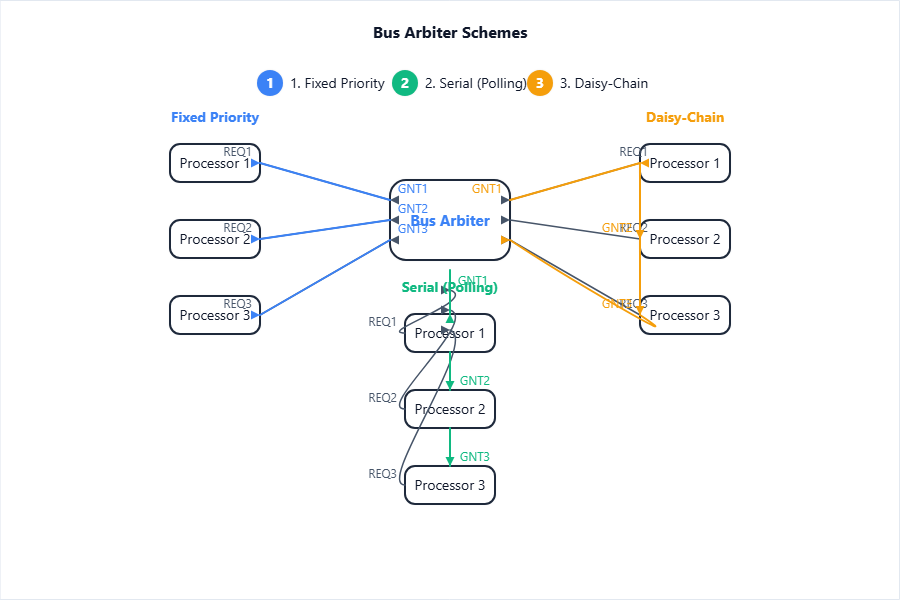
- Diagram shows how bus arbitration logic resolves access requests among CPUs.
3. Inter-Processor Communication and Synchronization
Need for Communication and Synchronization
[!IMPORTANT]
Inter-processor communication and synchronization are required to coordinate tasks, share data, avoid conflicts, and ensure correct sequence of parallel operations among processors.
- Enables processors to exchange data/results and prevent inconsistent or unpredictable outcomes.
Methods of Inter-Processor Communication
| Method | Description | Example |
|---|---|---|
| Shared Memory | Multiple processors access common RAM | Multi-thread apps |
| Message Passing | Processors exchange information via messages/mailbox | Cluster nodes |
Synchronization Techniques
Semaphore
[!IMPORTANT]
A semaphore is an integer variable used to signal and control access to shared resources among processes.
- Two atomic operations:
wait (P)andsignal (V)
Pseudocode:
wait(S):

  while S <= 0:

    // wait

  S = S - 1

signal(S):

  S = S + 1
Mutex and Spinlocks
-
Mutex: A mutual exclusion object allowing only one process at a time to access a resource.
-
Spinlock: Process repeatedly checks a lock variable (busy-wait) until it is available.
Barrier
[!IMPORTANT]
A barrier is a synchronization point where all processes wait until every process reaches the barrier, and only then proceed.
- Used in parallel computations to synchronize phases.
Race Conditions and Deadlocks
-
Race Conditions: When system behavior depends on the sequence/timing of multiple threads/processes.
-
Deadlocks: When two or more processors wait indefinitely for resources held by each other.
Hardware Support for Synchronization
Test-and-Set Instruction
-
Atomic operation: tests a variable and sets it, in one indivisible action
-
Used to implement locks/mutexes
Algorithm: Test-and-Set Lock
lock = 0 // initialize

function acquire_lock():

  while test_and_set(lock) == 1:

    // busy-wait (spin)

function release_lock():

  lock = 0
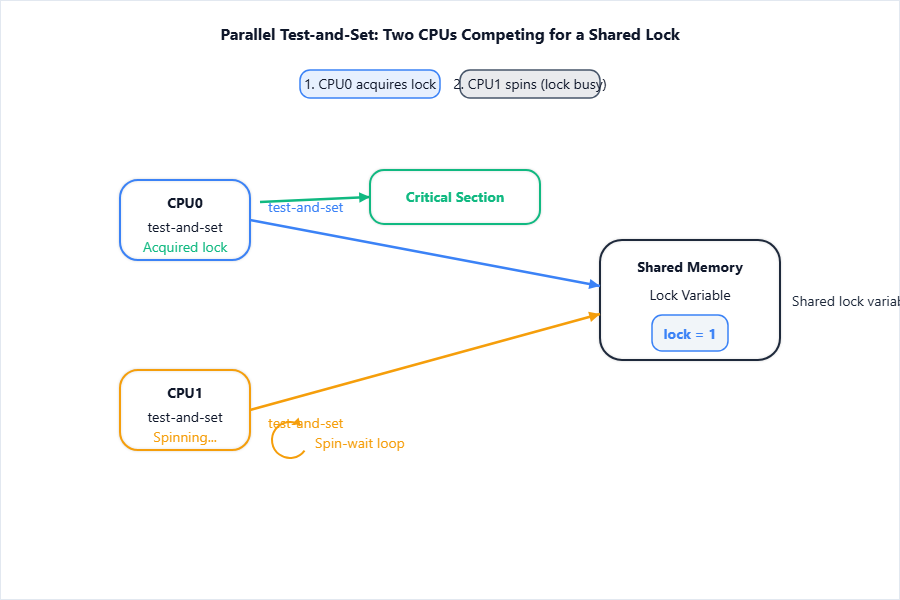
- Illustrates hardware synchronization of critical sections.
[!TIP]
Always mention Test-and-Set as a practical atomic synchronization technique!
4. Memory in Multiprocessor System
Memory Organization in Multiprocessors
| Organization | Description | Diagram Ref |
|---|---|---|
| Shared | All processors access a single global memory | (SMP) |
| Distributed | Each processor has local memory—communication via network | (MPP, cluster) |
| Hybrid | Combines aspects of shared and distributed | (NUMA, hybrid SMP) |
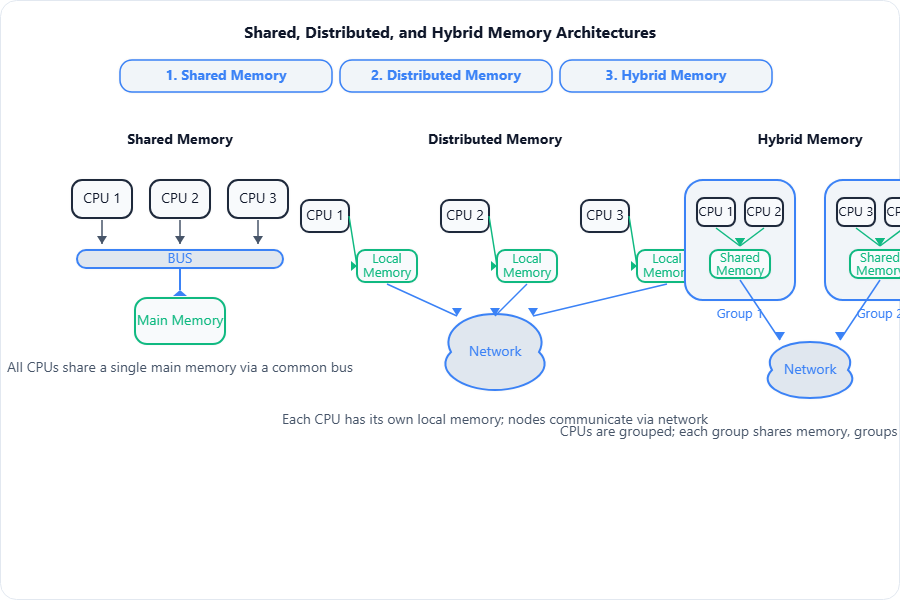
- Shows the major memory layouts for multiprocessors.
Cache Coherence Problem and Solutions
-
Cache Coherence Problem: Ensures uniformity of shared data in caches so all processors see latest values.
- E.g., when one CPU updates data, others’ caches must reflect the change.
MESI Protocol Overview
-
Four states for cache block: Modified, Exclusive, Shared, Invalid.
-
Ensures only one processor can modify a block, others get notified to invalidate or update their copy.
Bus Snooping
[!IMPORTANT]
Bus snooping is a mechanism where all cache controllers monitor (snoop) bus transactions to keep their cached data coherent.
- Enables updates/invalidations in real time as processors write to shared memory.
Memory Consistency Models
[!IMPORTANT]
A memory consistency model defines the order and visibility of memory operations (reads/writes) in a multiprocessor.
-
Strict Consistency: All memory ops instantly visible to all.
-
Sequential Consistency: Results as if operations occurred in some sequential order.
NUMA vs. UMA Architectures
| Feature | UMA (Uniform Memory Access) | NUMA (Non-Uniform Memory Access) |
|---|---|---|
| Memory Access Time | Same for all processors | Depends on location (near/far memory) |
| Memory Model | Single shared memory | Processors with local and shared memory |
| Scalability | Limited (bus bottleneck) | Better (via distributed memory) |
| Example | Simple SMP systems | Large servers, workstations |
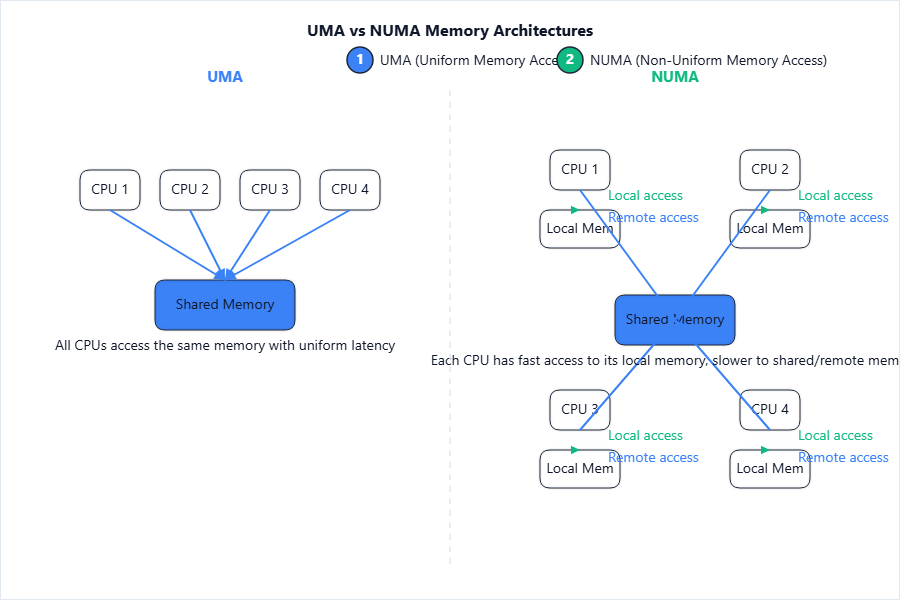
- Illustrates the difference in processor-to-memory connectivity and latency.
Memory Mapping Strategies
-
Interleaved Mapping: Addresses distributed for parallel access speed-up.
-
Static/Dynamic Partitioning: Predefined or on-the-fly allocation of memory blocks to processors.
5. Concept of Pipelining
Definition and Advantages
[!IMPORTANT]
Pipelining is a technique where multiple instruction stages are overlapped in execution, improving CPU instruction throughput.
- Each stage performs a part of instruction; different instructions processed concurrently at different stages.
Pipeline Stages
Typical stages:
-
Instruction Fetch (IF)
-
Instruction Decode (ID)
-
Operand Fetch (OF)
-
Execute (EX)
-
Write Back (WB)
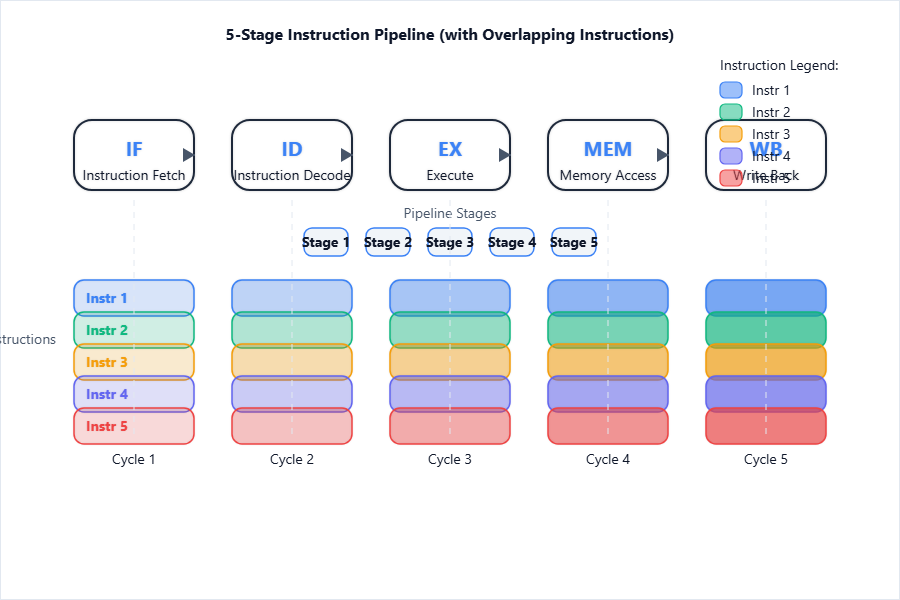
- Pipeline diagram visualizes parallel instruction processing.
Pipeline Hazards
| Hazard Type | Cause | Solution Ideas |
|---|---|---|
| Structural | Hardware resource conflict | Pipeline stalls |
| Data | Instruction uses data before it is ready (RAW dependency) | Forwarding, stalling |
| Control | Branches change flow; next instruction may not be correct | Branch prediction, delay slot |
Data Hazard Resolution: Forwarding, Stalling
-
Forwarding: Data is routed directly from output of one stage to input of another to avoid waiting.
-
Stalling: Pipeline is paused (bubbles inserted) until data is available.
Pipeline Performance Metrics
Speedup Formula:
Let:
-
$k$ = number of pipeline stages
-
$n$ = number of instructions
Time for non-pipelined = $n \cdot k \cdot t$
Time for pipelined = $(k + n - 1)t$
$$ \text{Speedup} = \frac{\text{Non-pipelined time}}{\text{Pipelined time}} = \frac{n \cdot k \cdot t}{(k + n - 1)t} $$
For large $n$,
$$ \text{Speedup} \approx k $$
Numerical Example:
A pipeline has 5 stages ($k = 5$). Find speedup for 20 instructions ($n = 20$).
Step 1: Non-pipelined time = $20 \times 5 \times t = 100t$
Step 2: Pipelined time = $(5 + 20 - 1)t = 24t$
$$ \boxed{\text{Speedup} = \frac{100t}{24t} = 4.17} $$
[!TIP]
State the speedup formula and show all steps in numericals for full marks!
6. Vector Processing
Definition & Basic Concept
[!IMPORTANT]
Vector processing is the simultaneous execution of one operation on multiple data (vector) elements by a vector processor.
- Speeds up tasks like scientific computing, graphics, and simulations.
Vector Processors vs. Scalar Processors
| Feature | Vector Processor | Scalar Processor |
|---|---|---|
| Data Handling | Operates on entire arrays/vectors | One data item/instruction |
| Throughput | Very high for vectorizable tasks | Lower |
| Instruction Type | Vector instructions (add entire arrays) | Scalar instructions |
| Application | Lin. algebra, simulations | General purpose tasks |
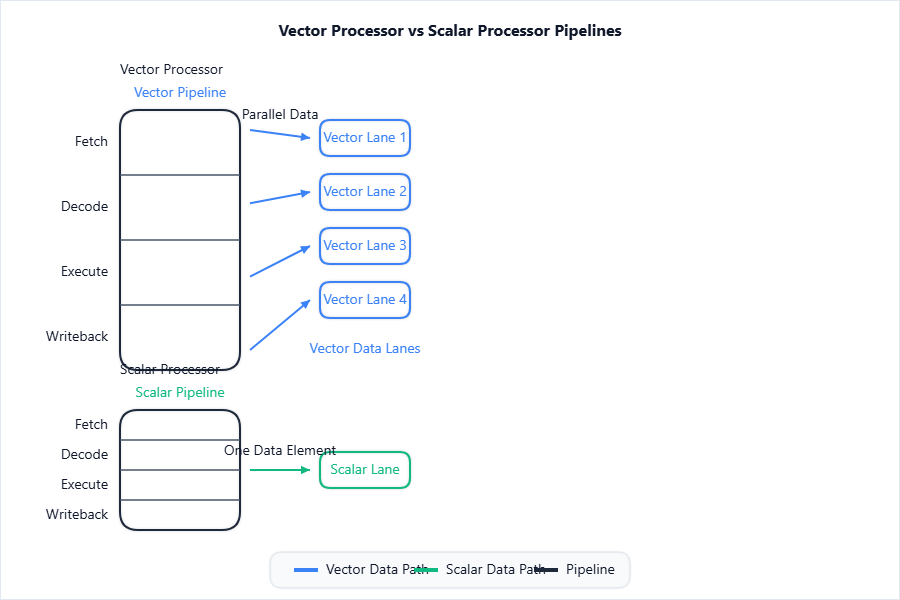
- Highlights parallel vs sequential data execution.
Vector Instructions and Their Execution
-
Vector Add:
V1 = V2 + V3adds whole vectors (arrays) in a single instruction. -
Execution: Uses vector registers and data pipelines for high throughput.
Applications of Vector Processing
- Weather forecasting, scientific simulations, deep learning, image/video processing.
7. Array Processing
Definition
[!IMPORTANT]
Array processing uses multiple processing elements organized in an array to perform the same operation simultaneously on different data items.
- Common in SIMD (Single Instruction, Multiple Data) architectures.
Array Processor Structure
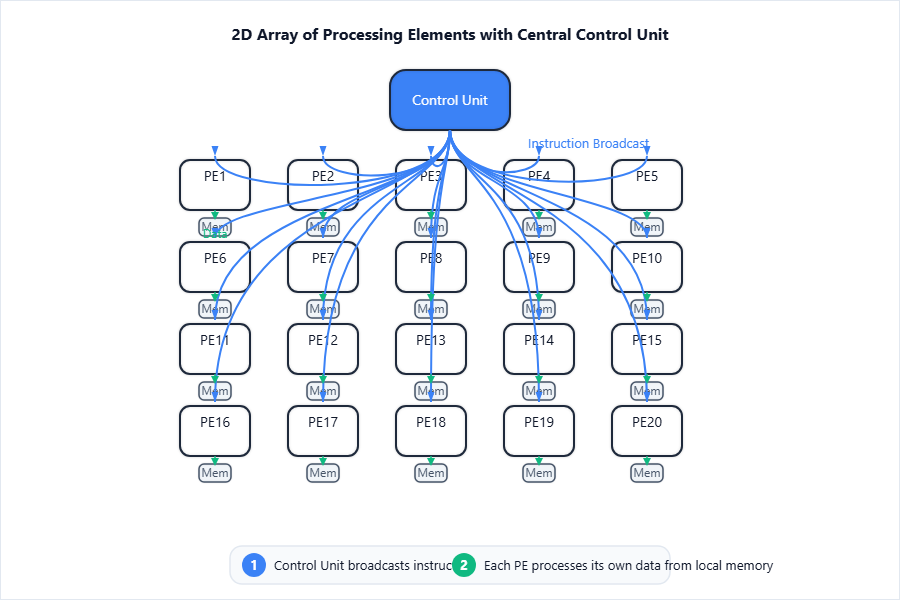
- Shows how a single instruction is dispatched to many processing elements in parallel.
Difference Between Vector and Array Processors
| Aspect | Vector Processor | Array Processor |
|---|---|---|
| Operation | Pipelined vector operations | Parallel (SIMD) in all PEs |
| Control | Single pipeline, vector reg. | Multiple PEs, centralized CU |
| Data Source | Uses vector registers | Uses local PE memory |
| Task | Array operations, math | Massive data-parallel tasks |
Applications of Array Processing
- Image processing, real-time signal processing, neural networks, weather simulation.
8. RISC and CISC
RISC Architecture: Characteristics & Features
[!IMPORTANT]
RISC (Reduced Instruction Set Computer) is a CPU design philosophy that uses a small set of simple instructions for fast execution and efficient pipelining.
- Fixed instruction length, load/store architecture, more registers, simple addressing modes.
CISC Architecture: Characteristics & Features
[!IMPORTANT]
CISC (Complex Instruction Set Computer) is a CPU design philosophy with a large set of complex instructions that can execute multi-step operations in a single instruction.
- Variable instruction length, many addressing modes, fewer registers, complex decoding.
Comparison: RISC vs. CISC
| Feature | RISC | CISC |
|---|---|---|
| Instruction Set | Small, simple | Large, complex |
| Cycle per Instruction | Typically 1 | Multiple cycles, variable |
| Memory Access | Load/store only | Allowed in many instructions |
| Pipelining | Easier, more efficient | Difficult, complex |
| Code Size | Larger, but faster execution | Smaller, but slower |
| Example | ARM, MIPS, PowerPC | x86, VAX |
Performance and Application Domains
-
RISC: Embedded systems, smartphones, high-performance computing where speed/power efficiency is key.
-
CISC: Desktop PCs, servers requiring compatibility and complex software support.
9. Study of Multicore Processor – Intel, AMD
Definition of Multicore Processors
[!IMPORTANT]
A multicore processor integrates two or more processing cores onto a single chip, allowing simultaneous execution of multiple threads or processes.
- Each core may have its own L1/L2 cache; they share higher-level memory/cache.
Overview of Intel Multicore Processors (Architecture Highlights)
-
Advanced CPUs (e.g., Intel Core i7) use multiple cores, hyper-threading, shared Smart Cache, Turbo Boost, and integrated graphics.
-
Emphasize high performance and energy efficiency.
Overview of AMD Multicore Processors (Architecture Highlights)
-
Ryzen series uses “Zen” architecture, simultaneous multithreading (SMT), large L3 cache, and Infinity Fabric interconnect for flexible scaling.
-
Focus on cost/performance and multi-threading.
Case Study Table: Intel Core i7 vs. AMD Ryzen
| Feature | Intel Core i7 (e.g., 12700K) | AMD Ryzen (e.g., Ryzen 7 5800X) |
|---|---|---|
| Cores/Threads | 12 (8P+4E)/20 | 8/16 |
| Architecture | Alder Lake | Zen 3 |
| L3 Cache | 25 MB | 32 MB |
| Max Turbo | 5.0 GHz | 4.7 GHz |
| Process Node | Intel 10nm | TSMC 7nm |
| Innovations | P+E cores, Thread Director | Chiplet design, Infinity Fabric |
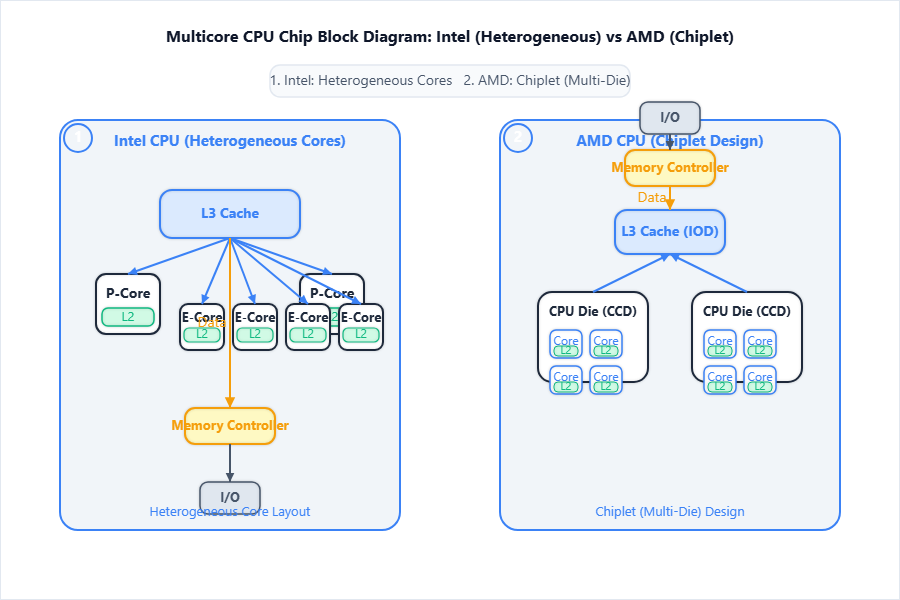
- Diagram highlights how modern CPUs organize multiple cores, caches, and buses on a chip.
Key Innovations and Features in Modern Multicore Designs
- Heterogeneous cores (Intel P-core/E-core), SMT (simultaneous multithreading), chiplet architecture, advanced power management (Dynamic Boost/SmartShift).
[!TIP]
To score best, always include formal definitions, cite at least one advantage/disadvantage, and draw/label requested diagrams in your answer sheet!