1. Introduction to .NET Framework
Overview and Evolution of .NET Framework
[!IMPORTANT]
The .NET Framework is a software development platform developed by Microsoft, providing a controlled programming environment for developing, deploying, and running applications for Windows and the web.
-
Introduced in the early 2000s, it unified application development for Windows using multiple languages and libraries.
-
Evolved from supporting desktop applications to also include ASP.NET for web applications and later .NET Core for cross-platform development.
-
.NET 5+ represents the latest evolution as a cross-platform, open-source framework unifying all .NET technologies.
Features of .NET Framework
-
Language Independence: Multiple languages (e.g., C#, VB.NET, F#) can be used.
-
Base Class Library (BCL): Provides essential classes for programmers.
-
Automatic Memory Management (Garbage Collection): Automates resource management and reduces memory leaks.
-
Type Safety & Security: Ensures types and memory accesses are reliable and secure.
-
Interoperability: Can interact with other technologies like COM or native code.
Architecture of .NET Framework
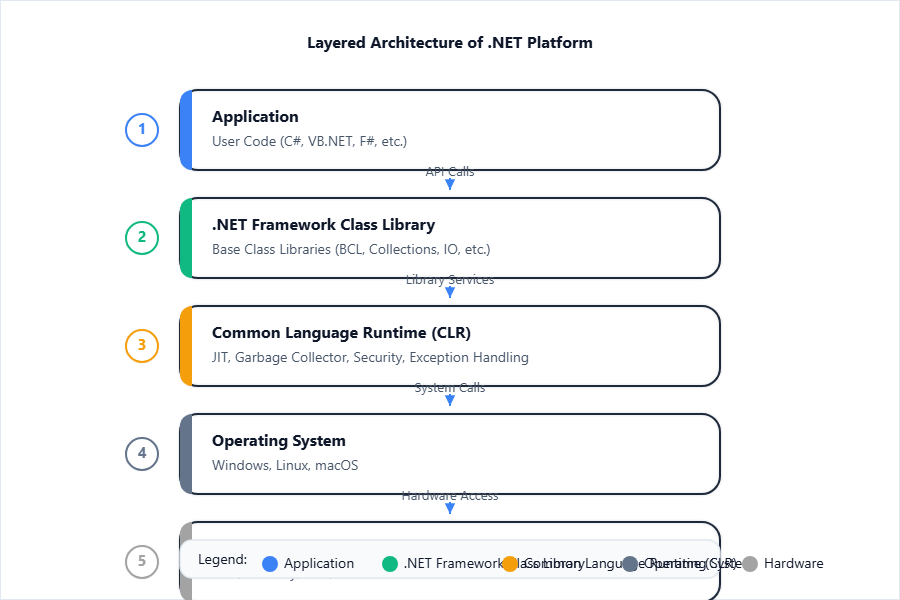
Diagram Description: Shows how applications interact with the .NET Framework Class Library, which calls services in the CLR that interacts with the OS and hardware.
-
Application Layer: User applications (console, web, Windows forms)
-
Framework Class Library (FCL): Collection of reusable classes.
-
Common Language Runtime (CLR): Provides the execution environment for .NET applications (memory management, threading, etc.).
-
Operating System Layer
Components and Elements of .NET Framework
1. CLR (Common Language Runtime):
[!IMPORTANT]
CLR is the execution engine of the .NET Framework that manages code execution, memory, security, and exception handling.
- Manages program execution, converts MSIL to native code (JIT compilation).
2. CTS (Common Type System):
[!IMPORTANT]
CTS is a specification in .NET that defines all possible data types and programming constructs for cross-language integration.
3. CLS (Common Language Specification):
[!IMPORTANT]
CLS is a subset of CTS ensuring interoperability between different .NET languages by defining a standard set of features.
4. Assemblies:
[!IMPORTANT]
An assembly is the smallest deployable unit in .NET, containing compiled code and metadata.
5. Interoperability:
[!IMPORTANT]
.NET enables interoperability so managed code can invoke native (unmanaged) code or COM objects.
2. Basic Features of C#
C# Fundamentals (Syntax, Data Types, Variables)
[!IMPORTANT]
C# is a statically-typed, object-oriented programming language developed for the .NET Framework.
-
Syntax is similar to C/C++/Java.
-
Data types: int, float, double, char, bool, string, etc.
-
Variables: Must be declared with a data type (e.g.
int number;)
Classes and Objects in C#
[!IMPORTANT]
A class is a blueprint for objects; objects are instances of classes with real values.
Example:
class Student

{
    public string name;

    public void Display() { Console.WriteLine(name); }

}
Student s1 = new Student();

s1.name = "Alice";

s1.Display();
[!TIP]
Always use PascalCase for class names and camelCase for variable names in C#.
Inheritance in C#
[!IMPORTANT]
Inheritance is the process by which a new class (derived) acquires the features of an existing class (base).
Syntax Example:
class Animal

{
    public void Eat() { Console.WriteLine("Eating"); }

}
class Dog : Animal

{
    public void Bark() { Console.WriteLine("Barking"); }

}
Dog inherits Eat() from Animal.
Polymorphism in C#
[!IMPORTANT]
Polymorphism allows objects to be treated as instances of their parent class, enabling method overriding and overloading.
- Compile-time (method overloading), Runtime (method overriding).
Operator Overloading
[!IMPORTANT]
Operator overloading allows user-defined types to define the behavior of operators (like +, -, etc.).
Example:
class Complex

{
    public int real, img;

    public static Complex operator +(Complex c1, Complex c2)

    {

        Complex c3 = new Complex();

        c3.real = c1.real + c2.real;

        c3.img = c1.img + c2.img;

        return c3;

    }

}
Structures in C#
[!IMPORTANT]
A structure is a value type similar to a class but stored on the stack and used for small data-holding types.
Example:
struct Point

{
    public int x, y;

}
3. Advanced Features of C#
Interfaces
[!IMPORTANT]
An interface defines a contract with method signatures but no implementation; classes implement interfaces.
Example:
interface IDrawable { void Draw(); }

class Circle : IDrawable { public void Draw() { Console.WriteLine("Circle"); } }
[!TIP]
A class can implement multiple interfaces (C# permits multiple interface inheritance).
Arrays in C#
[!IMPORTANT]
An array is a collection of elements of the same type, stored in contiguous memory locations.
Example:
int[] marks = new int[5];
Indexers and Collections
-
Indexers: Allow objects to be indexed like arrays.
class Sample { int[] arr = new int[5]; public int this[int i] { get { return arr[i]; } set { arr[i] = value; } } } -
Collections: Dynamic alternatives to arrays, e.g., List, Dictionary.
-
List<T>– dynamic, growable array -
Dictionary<K,V>– key-value pairs
-
Strings and Regular Expressions
-
Strings: Immutable sequences of Unicode characters (
string). -
Regular Expressions: Pattern-matching using
System.Text.RegularExpressions.Regex.Regex rx = new Regex(@"^\d{3}-\d{2}-\d{4}$"); // Matches SSN format
Exception Handling in C#
[!IMPORTANT]
Exception handling manages runtime errors using try, catch, finally, and throw blocks.
Example:
try { int x = 1 / 0; }

catch (DivideByZeroException e) { Console.WriteLine("Error"); }

finally { Console.WriteLine("Done"); }
Delegates and Events
-
Delegate: Reference type to store methods as objects.
public delegate void MyDelegate(string msg); -
Event: Mechanism for class to notify clients of something (observer pattern).
public event MyDelegate SomethingHappened;
4. ASP.NET
Installing the ASP.NET Framework
-
Install via Visual Studio or .NET SDK (
dotnetcommand-line for modern versions). -
Requires Windows or cross-platform (for ASP.NET Core).
Overview of CLR in ASP.NET
- CLR manages execution of ASP.NET applications: memory, security, garbage collection, and JIT compilation.
Class Library Concept
- ASP.NET leverages .NET’s BCL and specialized ASP.NET libraries (
System.Web).
ASP.NET Controls
HTML Controls
- Direct representation of HTML elements (e.g.,
<input>,<button>).
Standard Controls
- ASP.NET server controls providing enhanced features (e.g.,
<asp:Button>,<asp:Label>).
Validation Controls
[!IMPORTANT]
Validation controls provide client- and server-side validation for form input.
Examples:
-
RequiredFieldValidator -
RangeValidator -
CompareValidator -
RegularExpressionValidator -
CustomValidator
Rich Controls
- Controls offering high-level UI features, e.g.,
Calendar,FileUpload,GridView.
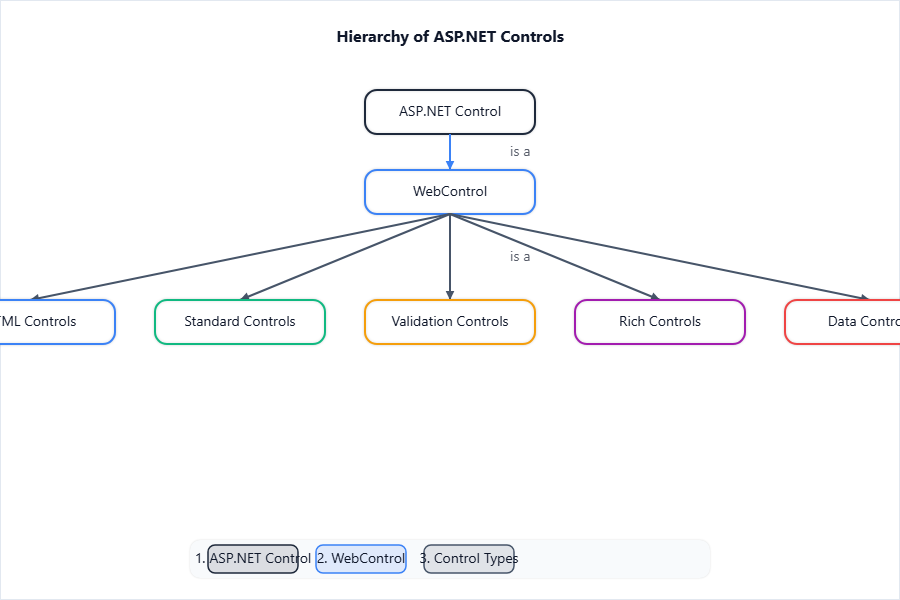
Diagram Description: Shows ASP.NET Control inheritance hierarchy, with division into HTML, Standard, Validation, Rich, and Data controls.
5. Windows Forms
Windows Form Fundamentals
[!IMPORTANT]
Windows Forms is a GUI class library for creating rich desktop applications on Windows.
- Main unit is the
Form, representing a window.
MDI (Multiple Document Interface) Form
[!IMPORTANT]
MDI allows a parent form to contain and organize multiple child forms (documents) within a single parent window.
Creating Windows Applications
-
Use Visual Studio: File > New > Project > Windows Forms App.
-
Inherit from
System.Windows.Forms.Form.
Adding Controls to Forms
-
Drag-and-drop from toolbox or add programmatically:
Button btn = new Button();

btn.Text = "Click";

this.Controls.Add(btn);
Handling Events in Windows Forms
[!IMPORTANT]
Events are actions like clicks, handled via event handler methods.
Example:
btn.Click += new EventHandler(ButtonClicked);

void ButtonClicked(object sender, EventArgs e) {

    MessageBox.Show("Hello!");

}
Windows Form Tools (Toolbox Overview)
- Toolbox contains built-in controls: Button, TextBox, Label, ComboBox, ListBox, etc.
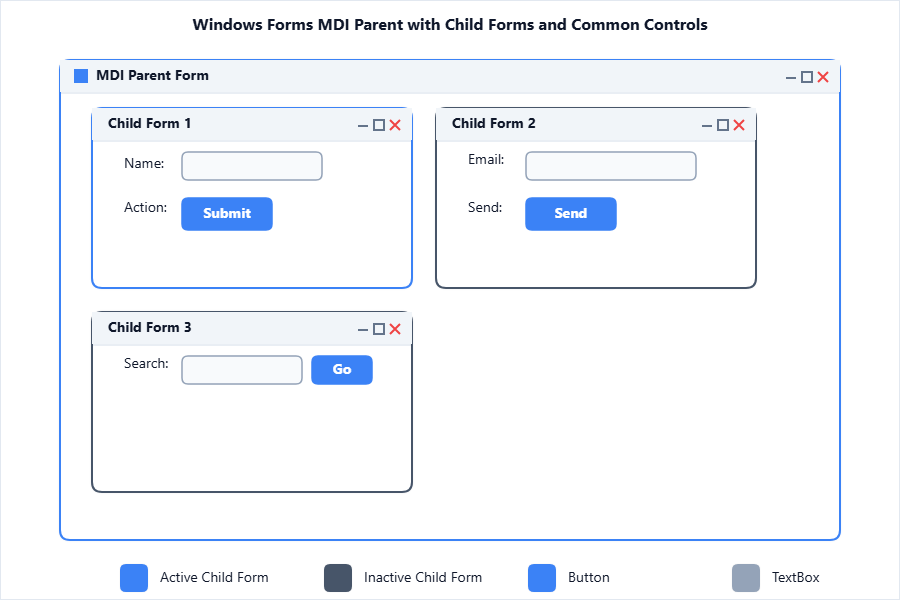
Diagram Description: Demonstrates form layout, MDI parent with child forms, controls placed and labelled.
6. ADO.NET
Overview of Component Object Model
[!IMPORTANT]
COM is Microsoft’s platform for component software interoperability. ADO.NET is newer and not completely dependent on COM.
ODBC and OLEDB Overview
-
ODBC (Open Database Connectivity): Standard API for accessing databases.
-
OLEDB (Object Linking and Embedding Database): COM-based API for accessing data from various sources.
SQL Connected Mode
[!IMPORTANT]
Connected mode uses DataReader to fetch data directly from the database by maintaining an open connection throughout.
Algorithm:
-
Create and open
SqlConnection. -
Define and execute
SqlCommand. -
Use
SqlDataReaderto read. -
Close connection.
Example:
SqlConnection con = new SqlConnection("conn_str");

con.Open();

SqlCommand cmd = new SqlCommand("SELECT * FROM Students", con);

SqlDataReader dr = cmd.ExecuteReader();

while (dr.Read()) { Console.WriteLine(dr["Name"]); }

con.Close();
Disconnected Mode
[!IMPORTANT]
Disconnected mode uses DataSet/DataAdapter, where data is loaded into memory and the connection to the database is closed while processing.
Algorithm:
-
Create Connection and DataAdapter.
-
Create a DataSet.
-
Use DataAdapter.Fill() to load data.
-
Work with DataSet offline.
Dataset and DataReader
| Aspect | DataSet | DataReader |
|---|---|---|
| Mode | Disconnected | Connected |
| Memory | More (in-memory) | Less (streaming) |
| Navigation | Forward/backward | Forward-only |
| Update Capable | Yes | No |
| Usage | Multiple tables | Read-only, fast |
Data Controls
-
GridView: Displays data in tabular/grid format.
-
DetailsView: Shows details of one record at a time.
-
DataSource Controls: For binding data to controls (e.g.,
SqlDataSource).
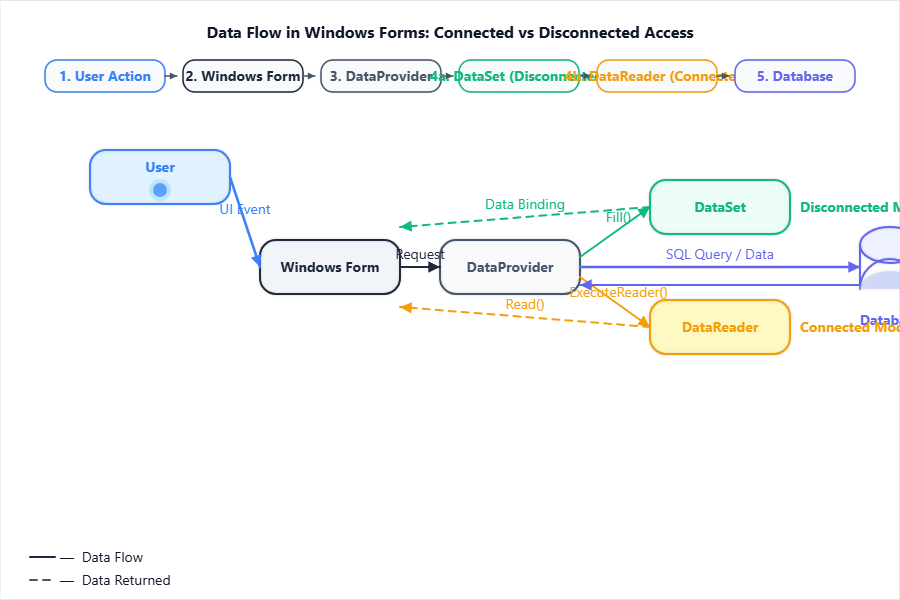
Diagram Description: Illustrates the flow of data from the user/app to the database and back, both in connected and disconnected scenarios.
[NUMERICAL NEEDED] Simple Data Manipulation Example
Insert record using ADO.NET:
SqlConnection con = new SqlConnection("conn_str");

SqlCommand cmd = new SqlCommand("INSERT INTO Students(Name) VALUES('Alice')", con);

con.Open();

int rows = cmd.ExecuteNonQuery();

Console.WriteLine($"{rows} record(s) inserted.");

con.Close();
- Output (if connection is valid):
1 record(s) inserted.
7. XML in .NET & Related Web Technologies
Introducing XML
[!IMPORTANT]
XML (eXtensible Markup Language) is a platform-independent, self-describing way to store and transport data.
DTD and XML Schema
-
DTD: Document Type Definition, defines the structure and legal elements/attributes in XML.
-
XML Schema (.xsd): More robust than DTD, uses datatypes, namespaces for structure definition.
DOM (Document Object Model)
[!IMPORTANT]
DOM is a tree-based API for accessing and manipulating XML documents as a hierarchy of nodes.
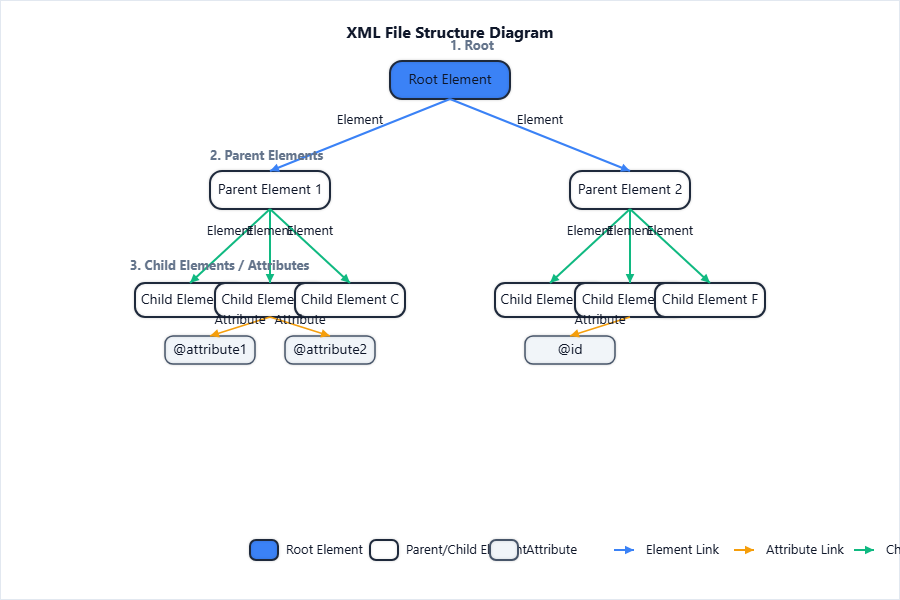
Diagram Description: Shows a sample XML’s tree representation as manipulated by DOM in .NET.
Handling XML in .NET
-
Use
System.Xmlclasses:XmlDocument,XmlReader,XmlWriterfor reading, manipulating, and saving XML.XmlDocument doc = new XmlDocument(); doc.Load("data.xml"); XmlNode root = doc.DocumentElement;
XML Data Source
- XmlDataSource: ASP.NET control to bind XML data to other controls (e.g., GridView).
Navigation Controls (using XML data)
- Controls like
Menu,TreeViewcan be bound to XML data viaXmlDataSource.
Web Parts
- Web Parts are customizable UI components a user can add or configure on a page (e.g., in portals).
JavaScript Integration with ASP.NET
[!IMPORTANT]
JavaScript can be used to enhance interactivity by calling JS functions from ASP.NET pages and exchanging data via AJAX.
Web Services Overview (SOAP, REST basics)
-
SOAP (Simple Object Access Protocol): XML-based, formal web service protocol.
-
REST (Representational State Transfer): Lightweight, uses HTTP methods, supports JSON/XML.
-
.NET can consume and expose both SOAP and REST services via WCF or ASP.NET Web API.
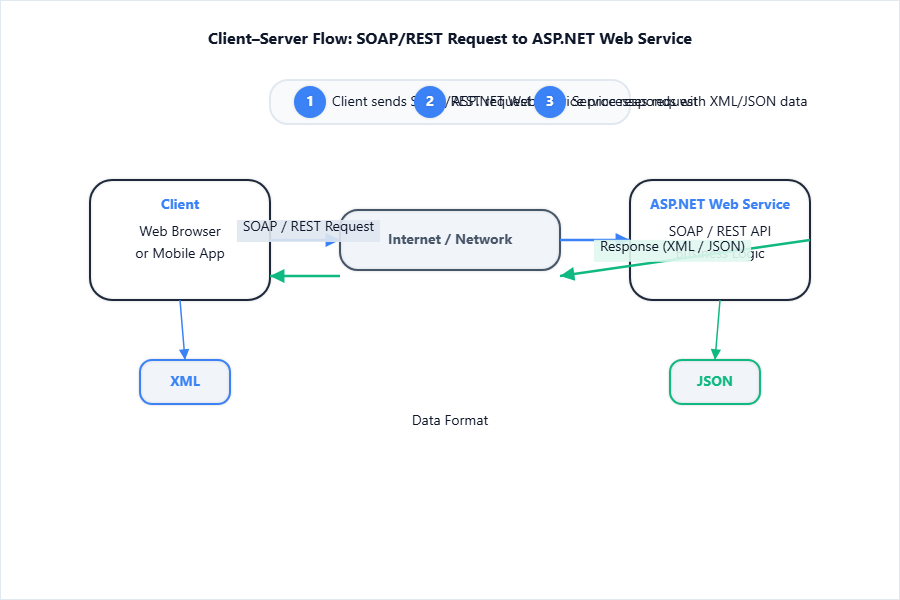
Diagram Description: Client-server interaction, showing request/response cycles with SOAP or REST (XML/JSON payloads).
[!TIP]
For each topic, focus on definitions, 2-line examples, and main differences/tables. Draw simple flow diagrams for architecture and data flow in the exam, and always label your diagrams!